Astral Playground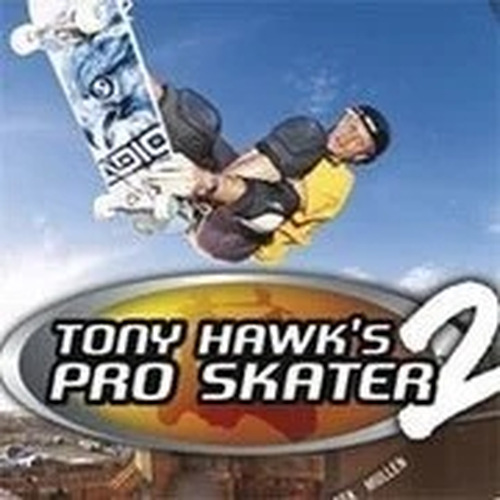
Tony Hawk's Pro Skater 2 Arcade
Reviews
Tony Hawk’s Pro Skater 2 online arcade game delivers a polished skateboarding experience with responsive keyboard controls. The levels are well-designed, offering multiple objectives that encourage exploration and replayability. The ability to save and load progress makes it easy to play in short sessions. The trick system is intuitive, and custom key bindings improve comfort. This game is a solid choice for fans of arcade sports games and provides lasting value through its challenges.
About This Game
Game Introduction
Tony Hawk’s Pro Skater 2 Online Arcade Game brings the classic skateboarding experience to your browser. Based on the iconic console title, this arcade adaptation lets players control a skater through detailed levels, performing tricks such as ollies, kickflips, and grinds on rails and ramps. The core objective is to complete various challenges, collect items, and achieve high scores while exploring each environment. What makes this version unique is its accessibility—optimized for keyboard play and designed to capture the original feel with smooth animations and responsive controls. Whether you are a longtime fan or new to skateboarding games, this game offers an authentic and engaging experience.
How to Play
Players control their skater using only the keyboard. To see the default controls, hover over the game screen to reveal icons and click the keyboard icon. For example, the A button on a controller corresponds to the Z key on your keyboard. Default keys include Z, X, A, S, and the Arrow keys. Press Enter to start the game. You can customize these key bindings to your preference. Save your progress by hovering over the game and clicking the down arrow icon. Load a saved game later using the up arrow icon, allowing you to continue where you left off.
Game Features
Features include keyboard controls that are easy to learn, a progress saving system for ongoing play, and classic skateboarding action with tricks and exploration. Levels are detailed with rails, ramps, and obstacles. The game supports custom key bindings for comfort. It is suitable for short breaks or longer sessions, and the progress saving feature helps you return to challenges without starting over.
Tips for Success
To excel, practice the basic tricks like ollies and kickflips to build a solid foundation. Learn the layout of each level to find the best lines for chaining tricks and collecting items. Use the save feature frequently to preserve your progress, especially before attempting difficult objectives. Experiment with different key bindings to find what feels most comfortable for you. Finally, take time to explore each level thoroughly to discover secret areas and bonus items that can boost your score.
Compatibility
Faq
Similar Games

Dunkers 2 Basketball Arcade
Simple controls and fast matches. Great for quick two-player fun without complex rules.
PLAY NOW
Dump Truck 3 Arcade Sports Game
Clean and simple rock delivery game. Perfect for relaxing breaks and casual play.
PLAY NOW
Kopanito Soccer Arcade
Simple keyboard controls and clean design. Great for quick soccer fun.
PLAY NOW
Dig & Spike Volleyball Sports Game
Two volleyball modes in one game. Simple controls and clean graphics. Good for quick fun.
PLAY NOW
Moto Trial Fest 2 Mountain Pack
Simple controls and realistic bike physics make this a fun, safe challenge for all ages.
PLAY NOW
Bike Mania 5 Arcade Sports Game
Smooth controls and fun balance challenges. Great for quick gaming sessions.
PLAY NOW